
FAQ Help Desk
How to create a anonymous CIR?
The process to create an anonymous CIR is a bit different in our new system.
It involves searching the created by field for the anonymous user and selecting it.
- If you are logged in, click New CIR in the top left of the green menu bar
- In the Created By field at the top, click the drop-down arrow and start searching for “anonymous”
- You will see the anonymous user appear, click to select it. This is the only time you should submit a CIR in a name other than your own.
- Fill out the remaining form fields for the CIR. Before hitting submit, ensure that the name and email are still the anonymous ones at the top.

I can’t remember my password
- Please click Log Out in the top menu. Once you are redirected to the login form, look for the “Forgot your password?” link and click it.
- After that, enter your email address and click “Get New Password”
- Check your email inbox for a message including a link to reset your password, click the link and follow the instructions on the new page.
How to include a screenshot/attachment?
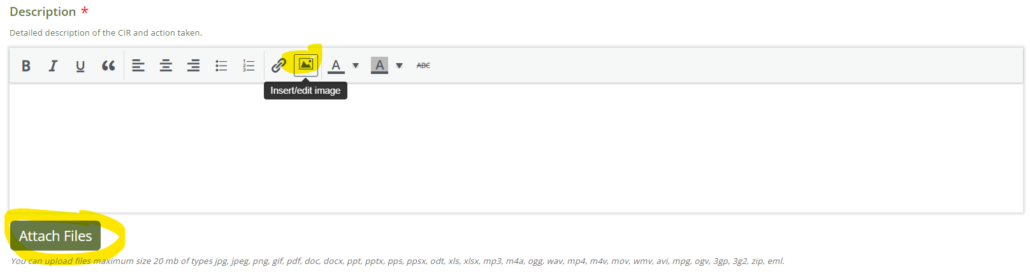
Please use the insert image icon in the text edit window. Or click attach files to add them as attachments instead. Copy and pasting images into the description field is not currently supported.
How to see actions/CIRs assigned to me
To see any CIRs that have been assigned to you, please use the filters at the top of the CIR list.
- Select the filter,
- click Mine,
- then click Apply.
See the screenshot below:

How to see all CIRs?
Are you only seeing some of the CIRs even though you know there are more to see? In the filter area at the top of the page, please click Reset to have all CIRs showing again.

When I click Submit As nothing happens
Make sure to scroll down the page and look for the Reply button.
Ignore the Canned Reply button, as it is only for admins to create Assigned Tasks
What is a Canned Reply? Why is it there?
Generally, please ignore this option throughout the site. This is something that was built to make it a bit easier for Admins to reply and assign users to tasks.
Why do I only receive notification of a CIR the first time I am assigned, but not upon every reply?
To keep inbox messages from getting out of hand, you will only receive a notification when you create a new CIR, or assigned a task on a CIR. If you are getting more than that, please let us know.
If you don’t see your question answered in the FAQ, please email us and we will get back to you.
